How to Pass Core Web Vitals for Free Using Next.js and Google PageSpeed Insights (2026 Guide)
A step-by-step developer tutorial on optimizing Next.js structures, handling script loading, and passing PageSpeed benchmarks without paid optimization tools.
The True Cost of Performance
It is a common misconception that achieving a perfect 100/100 on Google PageSpeed Insights requires expensive external speed optimization modules, CDNs, or premium consulting services. The reality in 2026 is that any modern developer can optimize performance metrics entirely for free inside an active Next.js directory.
Next.js provides a suite of native, built-in optimization components out of the box. The trick isn't paying for speed—it's understanding how to architect your code to let the framework do the heavy lifting.
1. Navigating Google PageSpeed Insights Diagnostics
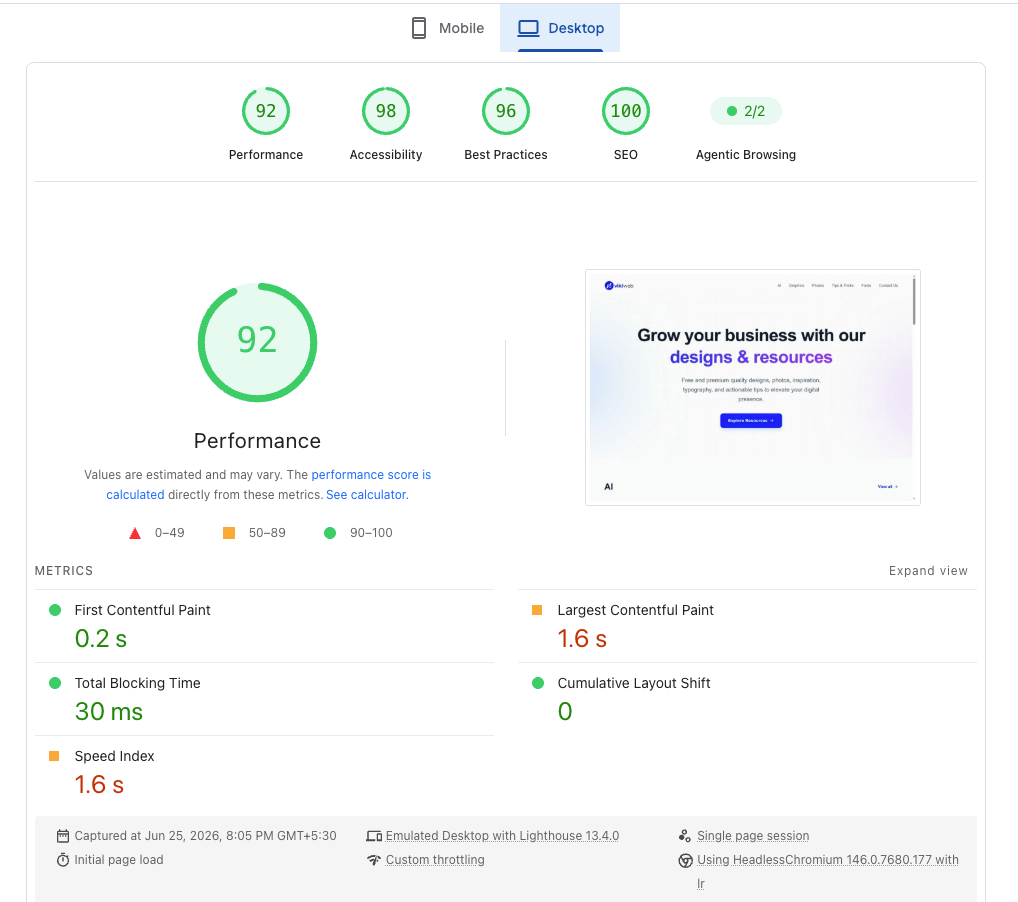
Before writing any code, you need to understand the battlefield. Google evaluates your site based on three primary Core Web Vitals:
- LCP (Largest Contentful Paint): Measures how quickly the main hero banner or primary text block is painted on the screen. It should occur within 2.5 seconds.
- INP (Interaction to Next Paint): The modern 2026 baseline for measuring code interaction response delays. It replaces FID and strictly measures how fast the page responds to user clicks and keyboard inputs. A good INP is under 200 milliseconds.
- CLS (Cumulative Layout Shift): Measures unexpected layout element shifts while loading. If a user tries to click a link, but an image loads and pushes the link down, causing an accidental click, your CLS score plummets. It should remain below 0.1.
Analyze Your Site via Google PageSpeed Insights
2. Zeroing Out CLS with Next.js Image Optimization
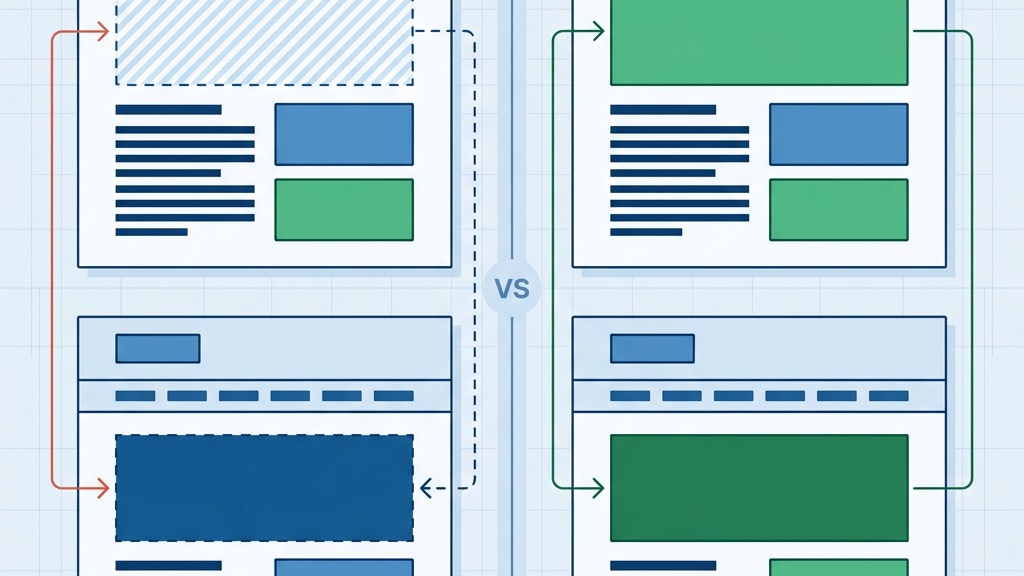
One of the easiest ways to fail Core Web Vitals is by using legacy HTML <img> tags. When a standard image loads, it doesn't know its dimensions until the file is fully downloaded, causing the surrounding layout to abruptly shift (destroying your CLS score).
Next.js's optimized next/image component fixes this inherently. By requiring width and height properties, it reserves the exact layout space before the image even begins downloading.
Furthermore, next/image automatically converts legacy JPEG/PNG files into modern AVIF or WebP formats, scales them based on the user's device screen, and enforces default lazy loading for images below the fold.
// ❌ Bad: High CLS and large payload
<img src="/hero-banner.jpg" alt="Hero" />

// ✅ Good: Zero CLS, Auto WebP, Lazy Loaded
import Image from 'next/image';

<Image
  src="/hero-banner.jpg"
  alt="Hero"
  width={1200}
  height={600}
  priority // Only use priority for above-the-fold LCP elements!
/>
3. Non-Blocking Scripts via Advanced Strategy Control
Heavy third-party marketing scripts, analytics trackers, and chat widgets are the number one killers of core speeds and INP scores. They block the main rendering thread, forcing the browser to process tracking payloads instead of responding to user interactions.
Next.js's native Script tag module (next/script) provides precise loading conditions to execute these payloads off the primary rendering thread. By using the lazyOnload strategy, you instruct the browser to wait until the page is fully idle before fetching the script, guaranteeing a zero-cost impact on your initial load.
import Script from 'next/script';

// ✅ Good: Executes only when the browser is idle
<Script
  src="https://www.google-analytics.com/analytics.js"
  strategy="lazyOnload"
/>
Official Next.js Script Optimization Rules
4. Core Optimization Checklist Matrix
Follow this actionable matrix to systematically eliminate performance bottlenecks before deployment.
| Metric to Fix | Immediate Diagnostic Tool | Next.js Implementation Strategy |
| :--- | :--- | :--- |
| LCP (Largest Contentful Paint) | Lighthouse Performance Panel | Add priority prop to hero <Image />, use proper text web fonts. |
| INP (Interaction to Next Paint) | Chrome DevTools (Performance Tab) | Shift heavy JS calculations to web workers, defer non-critical CSS. |
| CLS (Cumulative Layout Shift) | PageSpeed Insights / Layout Shift GIF | Hardcode width & height on all media, pre-define font bounding boxes. |
| TTFB (Time to First Byte) | Vercel Analytics / Network Tab | Utilize Static Site Generation (SSG) or Edge caching for primary routes. |
5. Performance Payout Summary
Optimizing your Next.js application isn't just about satisfying an arbitrary Google metric—it's a direct driver of business growth.
High-performance loading times directly correlate to higher user engagement, lower bounce rates, better SEO positioning, and increased ad revenue retention. By mastering next/image, controlling next/script execution, and minimizing layout shifts, you secure enterprise-grade speeds for absolutely free.
Continue Reading

The 5 AI Tools That Will Replace Your Content Marketing Agency in 2026
Discover the cutting-edge autonomous AI marketing tools that are rendering traditional content agencies obsolete this year.
Cursor v2 vs. VS Code: Why AI-Native IDEs are the Future of Next.js Development (2026)
A deep dive into why developers are abandoning VS Code for Cursor. We explore multi-file Composer edits, codebase indexing, and Next.js workflow optimization.

The 3 Best Free AI Tools for Web Developers & UI Designers (Tested & Reviewed)
A review of the best free AI tools for developers, including Vercel v0, Google AI Studio, and Figma.